
A complete, no-fluff audit of the errors quietly costing businesses their Google traffic — and exactly how to fix each one.
Quick Answer
The SEO mistakes that hurt Google rankings the most include thin or duplicate content, slow Core Web Vitals, poor mobile experience, weak internal linking, missing schema markup, ignoring search intent, keyword cannibalization, broken links, and skipping AI Overview optimization. Fixing these technical SEO mistakes and on-page SEO mistakes is usually the fastest path back to page one.
If your traffic has stalled, dropped, or never took off in the first place, the reason is rarely a single big blunder. It’s usually a handful of small, avoidable SEO mistakes stacking up quietly in the background — a slow page here, a missing meta description there, a pile of thin blog posts nobody asked for. Individually they seem minor. Together, they’re often the exact reason a perfectly good business stays invisible on Google.
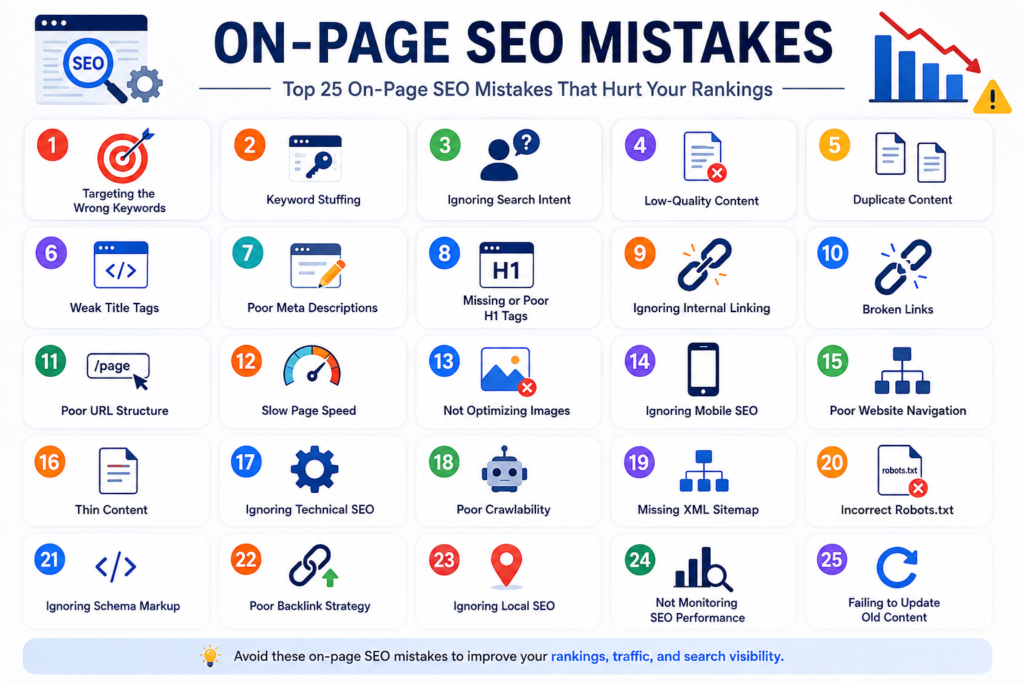
This guide breaks down the 25 most damaging SEO errors we see across on-page SEO, technical SEO, content, user experience, local SEO, off-page SEO, and the newer world of AI search — plus the step-by-step fix for each one. Whether you’re a business owner checking your own site or a marketing manager auditing a client’s, treat this as your working SEO audit checklist for 2026.
What’s inside
- Why SEO Mistakes Matter in 2026
- On-Page SEO Mistakes (1–5)
- Technical SEO Mistakes (6–11)
- Content SEO Mistakes (12–15)
- User Experience Mistakes (16–18)
- Local SEO Mistakes (19–21)
- AI Search & GEO Mistakes (22–24)
- Off-Page SEO Mistakes (25)
- How to Perform an SEO Audit
- Ranking Factors in 2026
- SEO Tools Worth Using
- Common SEO Myths
- Recovering From a Ranking Drop
- Why Choose Rank With Leads
- FAQs
- SEO Content Brief (bonus)
Why SEO Mistakes Matter in 2026
Search in 2026 isn’t just Google’s ten blue links anymore. Every ranking signal now feeds three overlapping systems at once: traditional Google Search, Google AI Overview and AI Mode, and a growing set of answer engines like ChatGPT Search, Perplexity, Gemini, and Microsoft Copilot. That means a single technical SEO mistake — a slow page, a missing canonical tag, unstructured content — no longer just costs you a ranking position. It can quietly remove you from AI-generated answers entirely.
At the same time, Google’s Search Quality Evaluator Guidelines keep pushing harder on EEAT (Experience, Expertise, Authoritativeness, Trustworthiness) and Helpful Content signals. Sites that once ranked on volume alone — publishing thin pages targeting every keyword variation — are the ones seeing the steepest Google ranking drops. The businesses still growing organically are the ones treating SEO as an ongoing discipline: monitoring Google Search Console, fixing indexing issues fast, and building genuinely useful content around real search intent.
Did you know?Google has repeatedly confirmed through Search Central documentation that page experience signals, including Core Web Vitals, work alongside — not instead of — relevance and content quality. A fast site with thin content still won’t outrank a slower site that actually answers the query well.
That’s the theme running through every mistake below: rankings rarely fail for one dramatic reason. They fail because small SEO errors compound until Google, and now AI search engines, quietly decide there are better answers elsewhere.
On-Page SEO Mistakes
Ignoring search intent Critical
This is the single most common of all on-page SEO mistakes: optimizing a page for a keyword without checking what searchers actually want when they type it. A “best running shoes” page written as a brand history instead of a comparison list will never rank, no matter how well it’s technically optimized.
Why it hurts rankings
Google’s ranking systems are built around satisfying search intent first. If your content type (guide, product page, list, tool) doesn’t match what’s already ranking, you’re fighting the algorithm, not working with it.
How to identify it
Search your target keyword and study the top 10 results. Are they mostly product pages, listicles, videos, or long-form guides? If your page format doesn’t match, that’s your answer.
Step-by-step fix
1) Search the exact keyword incognito. 2) Note the dominant content format and depth. 3) Rebuild your page to match that format while adding genuinely new value. 4) Re-check rankings after re-indexing.
Tools to fix it
Google Search, Ahrefs’ “Top Pages” report, Semrush Keyword Magic Tool (intent labels), Google Search Console (Queries report).
Expert tip: Group keywords by intent (informational, commercial, transactional, navigational) before you write a single word. This one habit fixes more ranking problems than any tool ever will.
Keyword cannibalization High
Keyword cannibalization happens when two or more pages on your own site target the same keyword, forcing Google to choose between them — and usually ranking both worse as a result.
Why it hurts rankings
Your link equity and relevance signals get split across competing URLs instead of concentrating on one strong page, weakening your overall SEO ranking factors for that topic.
How to identify it
In Google Search Console, filter the Queries report by a target keyword and check the Pages tab — if multiple URLs are getting impressions for the same query, you have cannibalization.
Step-by-step fix
1) Identify the strongest-performing page. 2) Merge or redirect weaker duplicates into it with a 301 redirect. 3) Update internal links to point to the winning URL. 4) Differentiate any pages you keep with distinct, non-overlapping intent.
Tools to fix it
Google Search Console, Ahrefs Site Audit, Screaming Frog.
Weak or missing title tags and meta descriptions High
Generic titles like “Home” or “Services – Company Name” waste your most valuable piece of on-page real estate for both click-through rate and relevance signals.
Why it hurts rankings
Title tags are still one of the clearest on-page relevance signals Google uses, and meta descriptions directly influence click-through rate from the search results page — even though they’re not a direct ranking factor.
How to identify it
Crawl your site with Screaming Frog and filter for duplicate, missing, or overly long/short titles and meta descriptions.
Step-by-step fix
1) Write unique titles under 60 characters with the primary keyword near the front. 2) Write compelling meta descriptions (150–160 characters) with a clear benefit or CTA. 3) Avoid duplicate titles across the site. 4) Re-crawl to confirm.
Tools to fix it
Screaming Frog, Sitebulb, Yoast SEO or RankMath (for CMS platforms), Google Search Console.
Thin content Critical
Thin content is any page that doesn’t fully answer the query it targets — short product descriptions, near-empty category pages, or blog posts padded with filler instead of substance.
Why it hurts rankings
Thin content is directly addressed in Google’s Helpful Content guidance and Quality Evaluator Guidelines as a signal of low value. It’s one of the fastest ways to trigger a site-wide Google ranking drop.
How to identify it
Pull a content inventory and flag pages under roughly 300 words that aren’t intentionally short-form (like a contact page). Cross-reference with low organic traffic in Google Analytics 4 (GA4).
Step-by-step fix
1) Audit every low-traffic page. 2) Decide: expand with genuine expertise, consolidate into a stronger page, or noindex/remove it. 3) Add original insight, data, or examples competitors are missing. 4) Resubmit through Search Console after publishing.
Tools to fix it
Screaming Frog (word count extraction), GA4, Google Search Console, Surfer SEO or Clearscope for content depth benchmarking.
Poor internal linking High
Many sites publish content and never link back to it from other relevant pages, leaving valuable pages isolated with no internal authority flowing in.
Why it hurts rankings
Internal linking is one of the most underused SEO ranking factors. It distributes authority across your site, clarifies topical relationships for crawlers, and directly affects crawl budget and indexing.
How to identify it
Run a crawl and check “Inlinks” per URL — pages with zero or one internal link are effectively invisible to both users and Google.
Step-by-step fix
1) Build a simple topic map of related pages.
2) Add 3–5 contextual internal links per page using descriptive anchor text.
3) Link new content back to relevant cornerstone pages immediately at publish.
4) Re-crawl quarterly to catch orphaned pages.
Tools to fix it
Screaming Frog, Sitebulb (visual internal link maps), Ahrefs Site Audit.
Technical SEO Mistakes
Poor internal linking Critical
Slow-loading pages, layout shifts, and sluggish interactivity are among the most measurable technical SEO mistakes, and they’re fully within Google’s Page Experience report.
Why it hurts rankings
Core Web Vitals (LCP, INP, and CLS) are confirmed Google ranking factors, and poor scores frustrate users into bouncing — compounding the damage with weak engagement signals.
How to identify it
Check the Core Web Vitals report in Google Search Console and run individual URLs through PageSpeed Insights.
Step-by-step fix
1) Compress and lazy-load images. 2) Minimize render-blocking JavaScript and CSS. 3) Use a CDN and enable caching. 4) Reduce third-party scripts. 5) Re-test in PageSpeed Insights and monitor field data monthly.
Tools to fix it
Google PageSpeed Insights, Google Search Console, GTmetrix, Chrome DevTools Lighthouse.
Not being optimized for mobile-first indexing Critical
Google indexes and ranks nearly every site based on its mobile version first. A site that looks fine on desktop but breaks on mobile is effectively showing Google a broken page.
Why it hurts rankings
Under mobile-first indexing, missing content, blocked resources, or unusable navigation on mobile directly limits what Google can index — regardless of how strong your desktop site is.
How to identify it
Use Google’s Mobile-Friendly Test and manually browse your site on a real phone, checking tap targets, font size, and pop-ups.
Step-by-step fix
1) Confirm mobile and desktop content match. 2) Fix tap target spacing and font sizing. 3) Remove intrusive interstitials. 4) Test forms and navigation on real devices.
Tools to fix it
Google Search Console (Mobile Usability report), Google Mobile-Friendly Test, BrowserStack.
Broken links, 404 errors, and redirect chains High
Dead internal links, uncaught 404 errors, and long chains of 301 redirects waste crawl budget and create dead ends for both users and search bots.
Why it hurts rankings
Every redirect hop and broken link erodes link equity and slows crawling, directly impacting how efficiently Google discovers and re-indexes your important pages.
How to identify it
Crawl the site for 4xx and 5xx status codes, then map any redirect chains longer than one hop.
Step-by-step fix
1) Fix or remove broken internal links. 2) Collapse redirect chains into a single 301 straight to the final URL. 3) 301-redirect old, removed pages to the closest relevant live page. 4) Recheck quarterly.
Tools to fix it
Screaming Frog, Ahrefs Broken Link Checker, Google Search Console (Crawl Stats report).
XML sitemap and robots.txt errors High
An outdated XML sitemap, or a robots.txt file accidentally blocking important sections of the site, are indexing issues that quietly keep entire page categories out of Google.
Why it hurts rankings
If Google can’t crawl or find a page, it can’t rank at all — this is one of the few SEO mistakes that causes total invisibility rather than a lower position.
How to identify it
Check the Sitemaps and Page Indexing reports in Google Search Console, and manually review robots.txt for accidental “Disallow” rules.
Step-by-step fix
1) Ensure the sitemap only includes canonical, indexable URLs. 2) Submit it in Search Console. 3) Audit robots.txt line by line. 4) Remove any rule blocking CSS, JS, or key content folders.
Tools to fix it
Google Search Console, Screaming Frog (robots.txt tester), Yoast/RankMath sitemap generators.
Missing structured data and schema markup High
Structured data helps Google — and increasingly AI Overviews and answer engines — understand exactly what a page is about, from articles to products to FAQs.
Why it hurts rankings
Without schema markup, you’re relying entirely on Google to infer context, and you miss out on rich results and eligibility for AI-generated answers that heavily favor clearly structured content.
How to identify it
Run key URLs through Google’s Rich Results Test and check the Enhancements reports in Search Console.
Step-by-step fix
1) Identify the right schema types per page (Article, FAQ, Product, LocalBusiness, HowTo). 2) Implement JSON-LD. 3) Validate with the Rich Results Test. 4) Monitor for errors in Search Console monthly.
Tools to fix it
Google Rich Results Test, Schema.org, Merkle’s Schema Markup Generator, RankMath/Yoast schema modules.
Duplicate content and canonical tag errors High
Duplicate content — from URL parameters, print versions, or copied product descriptions — confuses Google about which version to index and rank.
Why it hurts rankings
Without a clear canonical tag pointing to the preferred URL, Google may index the wrong version, split ranking signals, or simply ignore the duplicates entirely.
How to identify it
Use Search Console’s Page Indexing report to check for “Duplicate, Google chose different canonical than user” warnings.
Step-by-step fix
1) Set self-referencing canonical tags on all pages. 2) Canonicalize parameterized/duplicate URLs to the main version. 3) Rewrite duplicated product or category copy. 4) Recheck Search Console after changes propagate.
Tools to fix it
Google Search Console, Screaming Frog, Siteliner (duplicate content scanning).
Content SEO Mistakes
Letting content go stale Medium
Publishing a great article once and never touching it again is one of the quieter SEO mistakes — outdated stats, dead links, and old screenshots slowly erode trust and relevance.
Why it hurts rankings
Google increasingly favors content that reflects current information, especially for topics where freshness matters (pricing, tools, algorithm changes, statistics).
How to identify it
Sort your content inventory by publish date and cross-reference with declining GA4 traffic trends.
Step-by-step fix
1) Prioritize refreshing your highest-traffic-potential pages first. 2) Update stats, examples, and screenshots. 3) Expand thin sections. 4) Update the published/modified date and resubmit in Search Console.
Tools to fix it
GA4, Google Search Console (Performance report by date), Ahrefs Content Decay reports.
Keyword stuffing Medium
Repeating a target phrase unnaturally throughout a page is an outdated tactic that modern semantic SEO systems are specifically designed to detect and discount.
Why it hurts rankings
Google’s language models understand topics through entities and context, not exact-match repetition, so stuffing reads as manipulative rather than relevant — and can trigger quality-based demotions.
How to identify it
Read the page out loud. If any sentence sounds unnatural because of a repeated phrase, that’s stuffing.
Step-by-step fix
1) Rewrite for natural readability first. 2) Use synonyms, related entities, and semantic variations instead of exact repetition. 3) Aim for natural keyword density (roughly 1–2%), not a fixed count.
Tools to fix it
Surfer SEO, Clearscope, Hemingway Editor (readability check).
Ignoring topical authority and content clusters High
Publishing random, disconnected blog posts instead of building organized content clusters around core topics leaves your site looking shallow to both users and Google.
Why it hurts rankings
Topical authority is built through depth and internal structure — a hub page supported by related cluster pages, all interlinked — which Google’s systems reward with broader visibility across a topic.
How to identify it
Map your existing content against your core services. If clusters are missing large chunks of related subtopics your competitors cover, that’s your gap.
Step-by-step fix
1) Pick 3–5 core topics tied to your business. 2) Build one authoritative hub page per topic. 3) Support each hub with 8–15 cluster articles. 4) Interlink hub and clusters tightly.
Tools to fix it
Ahrefs Content Gap tool, Semrush Topic Research, Google Search Console.
Weak EEAT signals Critical
Content published with no visible author, no credentials, no sourcing, and no first-hand experience struggles to meet Google’s EEAT standard — especially on topics affecting health, money, or safety.
Why it hurts rankings
Google’s Search Quality Evaluator Guidelines explicitly instruct raters to check for genuine expertise and trustworthiness signals, and this bar is applied algorithmically at scale too.
How to identify it
Audit your key pages: is there a named author with real credentials? Are claims sourced? Is there evidence of first-hand experience?
Step-by-step fix
1) Add real author bios with relevant credentials. 2) Cite authoritative sources for claims and statistics. 3) Add original examples, case studies, or data. 4) Keep an About page and clear contact information current.
Tools to fix it
Google Search Quality Evaluator Guidelines (public PDF), Organization/Person schema, manual content review.
User Experience (UX) Mistakes
Intrusive interstitials and poor page experience Medium
Full-screen pop-ups that block content immediately after a visitor lands — especially on mobile — directly conflict with Google’s page experience guidance.
Why it hurts rankings
Page experience is a confirmed part of Google’s ranking systems, and intrusive interstitials are specifically called out as a negative signal.
How to identify it
Load your site on mobile as a first-time visitor and note anything blocking the main content within the first few seconds.
Step-by-step fix
1) Delay pop-ups until meaningful scroll or time-on-page. 2) Use smaller banners instead of full-screen takeovers. 3) Make close buttons obvious and easy to tap.
Tools to fix it
Google Search Console (Page Experience report), manual mobile testing, Hotjar for real behavior.
Confusing mobile navigation and layout High
Menus that require multiple taps to find key pages, tiny buttons, and horizontal scrolling all frustrate mobile users — who make up the majority of most sites’ traffic.
Why it hurts rankings
Poor mobile usability increases bounce rate and reduces engagement signals, and directly affects how Google evaluates the mobile-first version of your site.
How to identify it
Check the Mobile Usability report in Search Console and physically test navigation on a phone.
Step-by-step fix
1) Simplify menus to essential categories. 2) Increase tap target sizes. 3) Remove horizontal scroll issues. 4) Test checkout/contact flows end-to-end on mobile.
Tools to fix it
Google Search Console, Google Mobile-Friendly Test, real-device testing.
Unoptimized images and no lazy loading Medium
Uncompressed, oversized images without lazy loading are one of the most common causes of slow load times — and a purely fixable one.
Why it hurts rankings
Heavy, unoptimized images directly inflate Largest Contentful Paint (LCP), one of the three Core Web Vitals, while also hurting Image SEO visibility in Google Images.
How to identify it
Run PageSpeed Insights and check the “Properly size images” and “Serve images in next-gen formats” recommendations.
Step-by-step fix
1) Compress all images before upload. 2) Use modern formats like WebP or AVIF. 3) Enable lazy loading for below-the-fold images. 4) Add descriptive, keyword-relevant alt text for accessibility and Image SEO.
Tools to fix it
TinyPNG, Squoosh, PageSpeed Insights, native browser lazy-loading attributes.
Local SEO Mistakes
Incomplete or unclaimed Google Business Profile High
Local businesses routinely leave their Google Business Profile half-finished — missing hours, categories, photos, or a claimed status entirely.
Why it hurts rankings
Google Business Profile completeness is a major factor in local pack visibility, directly affecting whether nearby customers ever see you in local search results.
How to identify it
Search your business name plus your city. If you don’t appear in the local pack, or your listing looks sparse, that’s your signal.
Step-by-step fix
1) Claim and verify the listing. 2) Complete every field: categories, hours, services, photos. 3) Post updates regularly. 4) Respond to all reviews.
Tools to fix it
Google Business Profile Manager, BrightLocal, Whitespark.
Inconsistent NAP (name, address, phone) data Medium
Different versions of your business name, address, or phone number scattered across directories and your own website confuse both users and local ranking systems.
Why it hurts rankings
NAP consistency is a foundational local SEO ranking factor — inconsistent data weakens the trust signals Google uses to verify your business is legitimate and correctly located.
How to identify it
Search your business name across major directories (Google, Yelp, Bing Places, Facebook) and compare listed details against your website footer.
Step-by-step fix
1) Standardize your exact NAP format. 2) Update your website footer and schema markup. 3) Correct every directory listing to match. 4) Audit quarterly.
Tools to fix it
BrightLocal, Whitespark, Moz Local.
Ignoring reviews and local content Medium
Not actively collecting reviews or publishing zero location-specific content leaves local businesses invisible against competitors who do both consistently.
Why it hurts rankings
Review count, recency, and response rate are all part of Google’s local ranking systems, and location-specific pages help establish relevance for “near me” and city-based searches.
How to identify it
Compare your review count and recency against the top 3 local pack competitors for your main keyword.
Step-by-step fix
1) Build a simple, consistent review request process. 2) Respond to every review, positive or negative. 3) Publish location-specific service pages with real local detail, not templated copy.
Tools to fix it
BrightLocal, Podium, Google Business Profile.
AI Search & GEO Mistakes
Not optimizing for Google AI Overview and AI Mode Critical
Content written only for a traditional ranking position, with no clear, extractable answer near the top, is increasingly overlooked by Google AI Overview and AI Mode when generating summarized answers.
Why it hurts rankings
AI Overview and AI Mode pull from content that directly and concisely answers a query — pages that bury the answer under long intros or vague framing are simply harder to extract from.
How to identify it
Search your target queries and check whether an AI Overview appears, and if so, whether any of your content is being referenced.
Step-by-step fix
1) Open key sections with a direct, concise answer (40–60 words). 2) Use clear headings that mirror real questions. 3) Add FAQ schema. 4) Support claims with specific facts and sources rather than vague generalities.
Tools to fix it
Manual SERP checks, Google Search Console (impressions on AI-triggered queries), Schema markup validators.
Publishing AI-generated content without human review High
Mass-publishing AI-written content with no fact-checking, editing, or added expertise is one of the newest and most damaging SEO mistakes of the AI era.
Why it hurts rankings
Google has stated that content quality — not how it was produced — determines ranking eligibility, but unedited AI content commonly fails EEAT checks due to generic phrasing, factual errors, and lack of first-hand experience.
How to identify it
Look for content with no unique examples, generic advice found on dozens of other sites, or factual inconsistencies.
Step-by-step fix
1) Use AI as a drafting assistant, not a publisher. 2) Have a subject-matter expert fact-check and add original insight. 3) Edit for genuine voice and specificity. 4) Add real examples, data, or experience AI can’t invent.
Tools to fix it
Human editorial review (non-negotiable), Originality.ai for QA checks, Google Search Console for performance monitoring post-publish.
No structured, extractable answer format Medium
Long paragraphs with no headings, lists, tables, or FAQ sections make it harder for both readers and AI systems to extract a clean, quotable answer.
Why it hurts rankings
Answer engines like Perplexity, Copilot, and Gemini favor content that’s easy to parse and cite — clear headings, short answer blocks, and structured lists all improve extractability for GEO (Generative Engine Optimization).
How to identify it
Read your top pages and ask: could someone lift a clean 2–3 sentence answer from this without editing it?
Step-by-step fix
1) Add a direct-answer summary near the top of key pages. 2) Break up long paragraphs with H2/H3 headings. 3) Use tables and numbered lists where relevant. 4) Add an FAQ section with schema markup.
Tools to fix it
FAQ Schema generators, Hemingway Editor, manual formatting review.
Off-Page SEO Mistakes
A weak, spammy, or nonexistent backlink profile High
Some sites never build backlinks at all; others buy low-quality links from spammy directories. Both extremes are damaging in different ways.
Why it hurts rankings
Backlinks from relevant, authoritative sites remain one of the strongest off-page SEO ranking factors, while spammy or irrelevant links can trigger manual actions or algorithmic distrust.
How to identify it
Review your backlink profile for relevance and authority, and check Google Search Console for manual action notices.
Step-by-step fix
1) Audit existing backlinks and disavow clearly toxic, spammy links. 2) Build relationships for genuine editorial links through digital PR, guest content, and partnerships. 3) Prioritize relevance and authority over raw link count. 4) Track growth monthly.
Tools to fix it
Ahrefs, Semrush Backlink Audit, Google Search Console (Manual Actions report), Moz Link Explorer.
How to Perform an SEO Audit
A proper SEO audit follows a repeatable workflow rather than a random checklist. Here’s the order we recommend, whether you’re auditing your own site or a client’s:
- Crawl the full site (Screaming Frog or Sitebulb) to surface technical SEO mistakes at scale.
- Review Google Search Console for indexing issues, manual actions, and Core Web Vitals.
- Check Google Analytics 4 for traffic trends, engagement, and conversion drop-offs.
- Audit on-page elements: titles, meta descriptions, headings, internal linking.
- Evaluate content quality and EEAT signals against top-ranking competitors.
- Review the backlink profile for toxic links and missed opportunities.
- Test mobile usability and page experience on real devices.
- Prioritize fixes by impact and effort, starting with critical technical SEO mistakes.
SEO Audit Checklist
- Indexing status confirmed in Google Search Console
- XML sitemap and robots.txt reviewed
- Core Web Vitals within recommended thresholds
- Mobile usability issues resolved
- Canonical tags correctly implemented
- Duplicate and thin content addressed
- Schema markup validated with no errors
- Internal linking structure reviewed for orphaned pages
- Backlink profile audited for toxic links
- Search intent alignment checked for priority pages
The Most Important Google Ranking Factors in 2026
While Google never publishes a definitive ranking factor list, its own Search Central documentation and Quality Evaluator Guidelines consistently point to the same priorities.
| Priority | Ranking Factor | Why It Matters |
|---|---|---|
| Highest | Content quality & search intent match | Directly tied to Helpful Content systems and EEAT. |
| Highest | EEAT signals | Builds trust and expertise, especially for YMYL topics. |
| High | Core Web Vitals & page experience | Confirmed ranking system that improves usability. |
| High | Mobile-first usability | Google indexes the mobile version of your site first. |
| Medium-High | Backlink authority & relevance | A long-standing trust and authority signal. |
| Medium | Structured data / schema | Improves eligibility for rich results and AI-generated answers. |
| Medium | Internal linking structure | Distributes authority and clarifies topical relevance. |
| Medium | Freshness (topic-dependent) | More important for rapidly changing or newsworthy topics. |
Good SEO vs. Bad SEO
| Element | Good SEO | Bad SEO |
|---|---|---|
| Content | Answers search intent thoroughly with original insights. | Thin, generic, keyword-stuffed content. |
| Links | Earned, relevant, editorial backlinks. | Bought, spammy, or irrelevant links. |
| Technical | Fast, crawlable, with structured data (schema). | Slow pages, blocked resources, no schema. |
| On-page | Unique titles, clear headings, strong internal linking. | Duplicate titles, wall-of-text, orphaned pages. |
| Local | Complete profile with consistent NAP information. | Unclaimed listing and mismatched business details. |
SEO Tools Every Business Should Use
| Tool | Free or Paid | Best For |
|---|---|---|
| Google Search Console | Free | Indexing, Core Web Vitals, query performance |
| Google Analytics 4 (GA4) | Free | Traffic, engagement, conversions |
| Google PageSpeed Insights | Free | Core Web Vitals diagnostics |
| Screaming Frog | Free / Paid | Full-site technical crawls |
| Ahrefs | Paid | Backlinks, keyword research, content gaps |
| Semrush | Paid | Competitor analysis, audits, tracking |
| Moz | Free / Paid | Local SEO, domain authority tracking |
| Sitebulb | Paid | Visual technical SEO audits |
If auditing and fixing all of this in-house feels like a lot, that’s exactly the gap Rank With Leads‘ SEO audit services are built to close — a full technical, content, and EEAT review with a prioritized fix plan.
AI Search Optimization (GEO) Checklist
- Direct, concise answers (40–60 words) placed near the top of key sections
- FAQ schema implemented on question-driven pages
- Clear H2/H3 headings phrased as real questions
- Original data, examples, or first-hand experience included
- Content fact-checked and edited by a human subject-matter expert
- Entities and related concepts covered, not just exact-match keywords
- Tables and lists used for easily extractable comparisons
Common SEO Myths
Myth
“More keywords crammed into a page always means better rankings.” In reality, Google’s language understanding rewards natural, semantically rich writing over repetition — keyword stuffing is one of the outdated tactics that now actively hurts pages.
Myth
“Meta keywords still matter for rankings.” Google has not used the meta keywords tag as a ranking signal for years; time is better spent on titles and meta descriptions.
Myth
“AI-generated content is always penalized.” Google evaluates helpfulness and quality, not the method of production — the real risk is publishing unedited, unverified content.
Myth
“SEO is a one-time project.” Search engines, competitors, and AI search behavior all keep changing — an SEO audit checklist needs revisiting regularly, not once a year.
How to Recover From a Google Ranking Drop
A sudden Google ranking drop is alarming, but recovery usually follows a predictable process:
- Check Google Search Console for manual actions or security issues first.
- Compare the drop timing against known Google algorithm update dates.
- Review recent site changes: redesigns, migrations, content removal, or technical errors.
- Re-audit affected pages against current EEAT and Helpful Content expectations.
- Fix identified issues methodically, prioritizing the highest-traffic pages first.
- Monitor recovery over 4–8 weeks; algorithmic recoveries are rarely instant.
Did you know?
Google has repeatedly clarified through its Search Central blog that most core update impacts are not “penalties” — they’re a re-evaluation of relative content quality across the web, and recovery comes from genuinely improving content, not from a single quick fix.
Why Choose Rank With Leads for SEO Services
Fixing 25 categories of SEO mistakes across technical, content, UX, local, and AI search fronts is a lot to manage alongside running a business. That’s exactly where Rank With Leads fits in — with professional SEO services covering technical SEO, on-page optimization, local SEO, content marketing, and AI search optimization (GEO) under one roof.
Rather than generic monthly reports, the approach centers on a documented SEO audit checklist, transparent prioritization of fixes by impact, and ongoing monitoring through Google Search Console and GA4 — so you always know exactly what’s being fixed and why.
Not sure which SEO mistakes are costing you the most?
Request a comprehensive SEO audit from Rank With Leads and get a prioritized, plain-English action plan — no jargon, no guesswork.
Frequently Asked Questions
What are the most common SEO mistakes?
The most common SEO mistakes include thin content, ignoring search intent, slow Core Web Vitals, poor mobile usability, missing schema markup, weak internal linking, and duplicate content. Most ranking problems come from a combination of several small SEO errors rather than one major issue.
Why did my Google rankings suddenly drop?
Sudden Google ranking drops are usually caused by a core algorithm update, a technical issue like accidental noindex tags, a manual action, or a recent site change such as a redesign or migration. Check Google Search Console first for manual actions or indexing errors before assuming a penalty.
How often should I perform an SEO audit?
A full SEO audit should be done at least twice a year, with lighter technical checks monthly. Sites in competitive industries or those that publish frequently benefit from quarterly audits to catch indexing issues, broken links, and content decay early.
What are technical SEO mistakes?
Technical SEO mistakes are errors in a site’s infrastructure that block search engines from crawling, indexing, or ranking pages properly. Examples include slow Core Web Vitals, broken XML sitemaps, incorrect robots.txt rules, missing canonical tags, and unoptimized mobile experiences.
Can AI-generated content hurt SEO?
AI-generated content itself isn’t penalized by Google, but unedited, unverified AI content often fails EEAT standards due to generic phrasing and factual errors. Using AI as a drafting tool, then having a human expert fact-check and add original insight, avoids this SEO mistake.
How can I improve my Google rankings?
Improve Google rankings by matching content to real search intent, fixing technical SEO issues like site speed and mobile usability, strengthening EEAT signals, building a solid internal linking structure, and earning relevant backlinks. Consistent, prioritized fixes outperform one-time changes
Does page speed affect SEO?
Yes, page speed affects SEO through Core Web Vitals, which are a confirmed part of Google’s page experience ranking systems. Slow-loading pages also increase bounce rates, weakening engagement signals that indirectly influence rankings as well.
How do I optimize content for Google AI Overview?
Optimize for Google AI Overview by opening sections with direct, concise answers, using clear question-based headings, adding FAQ schema, and supporting claims with specific facts rather than vague statements. Content that’s easy to extract cleanly is more likely to be referenced.
Conclusion
None of these 25 SEO mistakes are unusual, and none of them require a complete website rebuild to fix. What matters is treating SEO as an ongoing audit process — checking Google Search Console regularly, keeping content genuinely useful and current, staying on top of Core Web Vitals, and now, making sure your best content is structured for AI Overviews and answer engines too.
Start with the mistakes marked “Critical” above, work through the SEO audit checklist section by section, and track your progress in Search Console and GA4. If you’d rather have an experienced team run the full audit and execute the fixes, Rank With Leads offers exactly that — from technical SEO and content strategy to local SEO and AI search optimization.
This guide is reviewed against current Google Search Central documentation and Search Quality Evaluator Guidelines, and will be updated as ranking systems evolve through 2026.